A Python CLI tool to decrypt and export Google Chrome cookies on macOS and Windows.
Handles the full decryption pipeline: reading Chrome's SQLite cookie database, fetching the encryption key (Keychain on macOS, DPAPI + Local State on Windows), decrypting the values, and writing results in your format of choice.
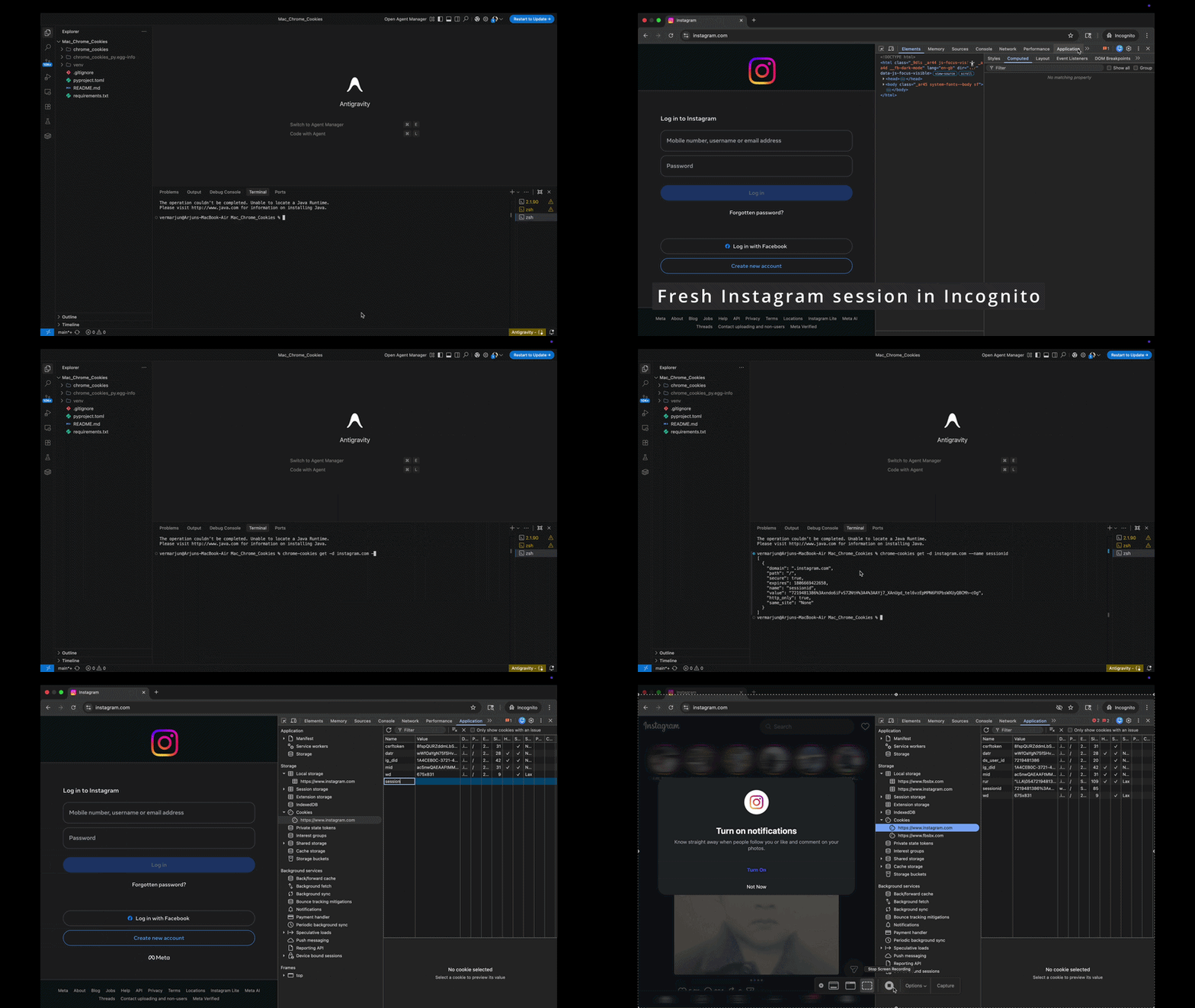
Check out the complete video here (heigher fps, clear visuals): https://youtu.be/2JNB1aBwUN0
| macOS | Windows | |
|---|---|---|
| OS | macOS 12+ | Windows 10/11 |
| Python | 3.10+ | 3.10+ |
| Chrome | Installed | Installed |
| Extra | Full Disk Access for terminal | pip install pywin32 |
# macOS
pip install git+https://github.com/vermarjun/chrome-cookies-py.git

# Windows (also installs pywin32)
pip install "git+https://github.com/vermarjun/chrome-cookies-py.git#egg=chrome-cookies-py[windows]"git clone https://github.com/vermarjun/chrome-cookies-py.git
cd chrome-cookies-py
# macOS
pip install -e .
# Windows
pip install -e ".[windows]"Chrome's cookie database is protected by macOS privacy controls.
- Open System Settings → Privacy & Security → Full Disk Access
- Click + and add your terminal app (Terminal, iTerm2, VS Code, etc.)
- Re-launch the terminal
The tool reads Chrome's encryption key from the macOS Keychain. The first time you run it, a dialog may appear — click Always Allow.
The tool uses Windows DPAPI to decrypt Chrome's key stored in Local State. This requires the pywin32 package:
pip install pywin32No additional permissions are required; DPAPI operates under your logged-in user account automatically.
chrome-cookies [--platform mac|windows] COMMAND [OPTIONS]
The --platform flag selects which OS's Chrome installation to target. It auto-detects from the current OS when not set, so you typically never need to pass it.
| Flag | Short | Description |
|---|---|---|
--platform |
-P |
mac or windows. Auto-detected from current OS. |
| Command | Description |
|---|---|
get |
Retrieve and decrypt cookies with filters |
profiles |
List all available Chrome profiles |
export |
Export cookies for a domain to a file (format auto-detected) |
| Flag | Short | Description |
|---|---|---|
--domain |
-d |
Filter by domain (e.g. google.com) |
--profile |
-p |
Chrome profile directory name (default: Default) |
--name |
-n |
Filter by exact cookie name |
--all-profiles |
Merge cookies from all Chrome profiles | |
--include-expired |
Include expired cookies (excluded by default) | |
--secure-only |
Only return Secure cookies | |
--format |
-f |
Output format (see Output Formats) |
--output |
-o |
Write to file (format inferred from extension) |
| Flag | Short | Description |
|---|---|---|
--format |
-f |
Output format: json, csv, txt, md |
--output |
-o |
Write to file |
chrome-cookies export DOMAIN OUTPUT_FILE [OPTIONS]Shorthand for get -d DOMAIN -o OUTPUT_FILE. Format is auto-detected from the file extension.
| Format | Flag | Extension | Description |
|---|---|---|---|
| JSON | json |
.json |
Array of cookie objects |
| CSV | csv |
.csv |
Spreadsheet-compatible |
| Plain text | txt |
.txt |
ASCII table for terminal |
| Markdown | md |
.md |
GitHub-flavored table |
| Netscape | netscape |
— | curl --cookie / wget --load-cookies compatible |
| HAR | har |
.har |
HTTP Archive (import into browser DevTools) |
| Env vars | env |
.env / .sh |
Shell KEY=value pairs |
When --output is provided without --format, the format is inferred from the file extension automatically.
# All cookies from the Default profile (JSON to stdout)
chrome-cookies get

# Filter by domain
chrome-cookies get -d google.com

# Save to a file (format inferred as JSON)
chrome-cookies get -d github.com -o github_cookies.json# Explicit platform (normally auto-detected)
chrome-cookies --platform mac get -d google.com
chrome-cookies --platform windows get -d google.com# Markdown table
chrome-cookies get -d github.com -f md
# Plain-text ASCII table
chrome-cookies get -d google.com -f txt
# CSV (open in Excel / Numbers / Sheets)
chrome-cookies get -d twitter.com -o twitter.csv# Export Netscape cookie file, then pass to curl
chrome-cookies get -d api.example.com -f netscape -o cookies.txt
curl -b cookies.txt https://api.example.com/protected
# Or wget
wget --load-cookies=cookies.txt https://api.example.com/protected# Export as env vars, source into your shell
chrome-cookies get -d myapp.local -f env -o cookies.env
source cookies.env
echo $SESSION_ID# Export HAR file for browser DevTools analysis
chrome-cookies get -d example.com -f har -o example.har
# Open DevTools → Network → Import HAR# List all available Chrome profiles
chrome-cookies profiles
# Get cookies from a specific profile
chrome-cookies get -p "Profile 1" -d slack.com
# Merge cookies from all profiles
chrome-cookies get --all-profiles -d google.com -o all_profiles_google.json# Only non-expired, secure cookies
chrome-cookies get -d example.com --secure-only
# Include expired cookies
chrome-cookies get -d example.com --include-expired
# Find a specific cookie by name
chrome-cookies get -d github.com --name user_session# Format auto-detected from extension
chrome-cookies export google.com google.json
chrome-cookies export github.com github.csv
chrome-cookies export slack.com slack.md| macOS | Windows | |
|---|---|---|
| Chrome data path | ~/Library/Application Support/Google/Chrome |
%LOCALAPPDATA%\Google\Chrome\User Data |
| Key source | macOS Keychain (security CLI) |
Local State JSON (DPAPI-encrypted) |
| Cookie cipher | AES-128-CBC | AES-256-GCM (Chrome 80+) or DPAPI (pre-80) |
| Extra dependency | None | pywin32 |
{
  "domain": ".github.com",
  "name": "user_session",
  "value": "abc123...",
  "path": "/",
  "expires": 1735689600000,
  "secure": true,
  "http_only": true,
  "same_site": "Lax"
}
expires is a Unix timestamp in milliseconds. Session cookies have expires = 0.
{
  "directory": "Default",
  "display_name": "John"
}
Pass directory to --profile when filtering by profile.
from chrome_cookies import get_cookies, get_profiles

# Auto-detect platform (recommended)
cookies = get_cookies()
cookies = get_cookies(domain="google.com")
cookies = get_cookies(domain="slack.com", profile="Profile 1")

# Explicit platform
cookies = get_cookies(domain="google.com", platform_name="mac")
cookies = get_cookies(domain="google.com", platform_name="windows")

# List profiles
profiles = get_profiles()
for p in profiles:
print(p.directory, p.display_name)Failed to read Chrome Safe Storage from Keychain (macOS)
Grant Full Disk Access to your terminal (see Setup). Also ensure Chrome has been launched at least once.
pywin32 is required on Windows
Run pip install pywin32, then retry.
Chrome user data directory not found
Chrome is not installed or is in a non-standard location.
- macOS: check
~/Library/Application Support/Google/Chrome - Windows: check
%LOCALAPPDATA%\Google\Chrome\User Data
Chrome profile "X" not found
Run chrome-cookies profiles to see valid directory names.
Empty cookie values
Cookies with a prefix other than v10/v11 are not supported. Pre-Chrome-80 DPAPI-only cookies on Windows are handled via a legacy fallback.
MIT