templates: allow users to share templates with accounts or projects through UI #36
Conversation
This file contains hidden or bidirectional Unicode text that may be interpreted or compiled differently than what appears below. To review, open the file in an editor that reveals hidden Unicode characters.
Learn more about bidirectional Unicode characters


updateTemplate permissions API


Member
|
Moved: apache#3241 |
shwstppr
added a commit
that referenced
this pull request
Aug 16, 2021

Signed-off-by: Abhishek Kumar <[email protected]>

ui: fix UI label bug #28 (#34)

Signed-off-by: Abhishek Kumar <[email protected]>

fix system vm migration with zone wide storage (#35)

* fix system vm migration with zone wide storage

Signed-off-by: Abhishek Kumar <[email protected]>

* fix

Signed-off-by: Abhishek Kumar <[email protected]>

* fix spacing

Signed-off-by: Abhishek Kumar <[email protected]>

* add empty volumes check

Signed-off-by: Abhishek Kumar <[email protected]>

fix fr568 issue #28 (#36)

Fixes systemvm migration with zone-wide storage
Check only for usable volumes

Signed-off-by: Abhishek Kumar <[email protected]>

vmware: fix error msg for vmotion without shared storage (#37)

Fixes error message which wrongly mentions worker VM

Signed-off-by: Abhishek Kumar <[email protected]>

refactor error message for interpod systemvm migration (#38)

Fixes error message introduced in #28

Signed-off-by: Abhishek Kumar <[email protected]>
shwstppr
added a commit
that referenced
this pull request
Nov 23, 2021

Signed-off-by: Abhishek Kumar <[email protected]>

ui: fix UI label bug #28 (#34)

Signed-off-by: Abhishek Kumar <[email protected]>

fix system vm migration with zone wide storage (#35)

* fix system vm migration with zone wide storage

Signed-off-by: Abhishek Kumar <[email protected]>

* fix

Signed-off-by: Abhishek Kumar <[email protected]>

* fix spacing

Signed-off-by: Abhishek Kumar <[email protected]>

* add empty volumes check

Signed-off-by: Abhishek Kumar <[email protected]>

fix fr568 issue #28 (#36)

Fixes systemvm migration with zone-wide storage
Check only for usable volumes

Signed-off-by: Abhishek Kumar <[email protected]>

vmware: fix error msg for vmotion without shared storage (#37)

Fixes error message which wrongly mentions worker VM

Signed-off-by: Abhishek Kumar <[email protected]>

refactor error message for interpod systemvm migration (#38)

Fixes error message introduced in #28

Signed-off-by: Abhishek Kumar <[email protected]>
Sign up for free
to join this conversation on GitHub.
Already have an account?
Sign in to comment


Add this suggestion to a batch that can be applied as a single commit.
This suggestion is invalid because no changes were made to the code.
Suggestions cannot be applied while the pull request is closed.
Suggestions cannot be applied while viewing a subset of changes.
Only one suggestion per line can be applied in a batch.
Add this suggestion to a batch that can be applied as a single commit.
Applying suggestions on deleted lines is not supported.
You must change the existing code in this line in order to create a valid suggestion.
Outdated suggestions cannot be applied.
This suggestion has been applied or marked resolved.
Suggestions cannot be applied from pending reviews.
Suggestions cannot be applied on multi-line comments.
Suggestions cannot be applied while the pull request is queued to merge.
Suggestion cannot be applied right now. Please check back later.
Description
Problem: CloudStack users want the ability to share templates with other accounts or projects through the UI.
Root Cause: The ‘updateTemplatePermissions’ is only available via API and needs to be integrated with the UI in order to allow users to share templates with other accounts within the same domain, and also with projects that the sharing account has access to.
Solution: The CloudStack UI template view has been extended to include a button that allows users to update template permissions through the ‘updateTemplatePermissions’ API. This API supports 3 operations i.e. add, remove or reset. The reset operation does not require any parameters and it simply removes all permissions for a template. The add and remove parameters require either accounts or projects to be specified for sharing or stop sharing templates. The ‘listAccounts’ API has been extended to allow users to see all the accounts within the same domain if the global setting ‘allow.view.all.domain.accounts’ is set to true. This allows the accounts selection to be a multi-selection.
Types of changes
Screenshots (if appropriate):
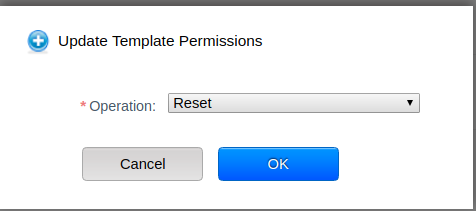
Reset Operation hides the Accounts and Project ID fields as this operation does not require any additional parameters to be set.
Operation = Reset; Account and Project fields not displayed
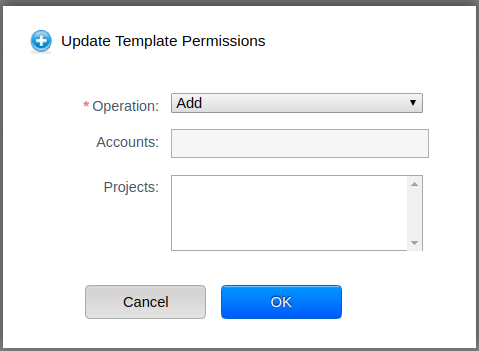
Operation = Add/Remove , global setting: 'allow.user.view.all.domain.accounts' = false;
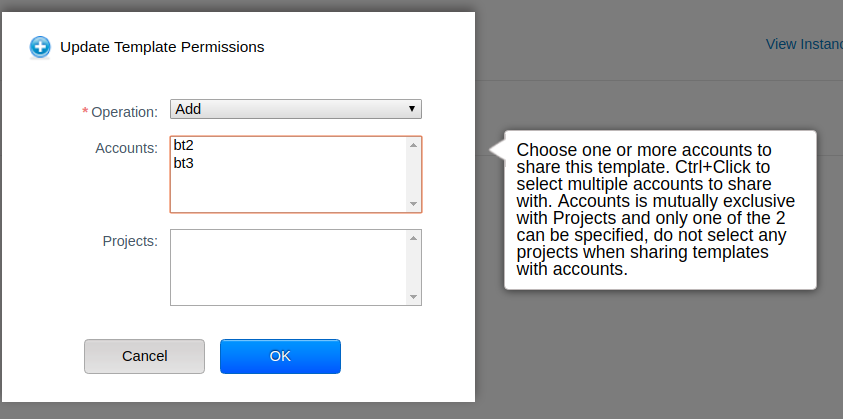
Operation = Add , global setting: 'allow.user.view.all.domain.accounts' = true; Domain has 3 accounts in total (bt1, bt2 and bt3). Logged in user is bt1 and so it is not shown on the dropdown list.
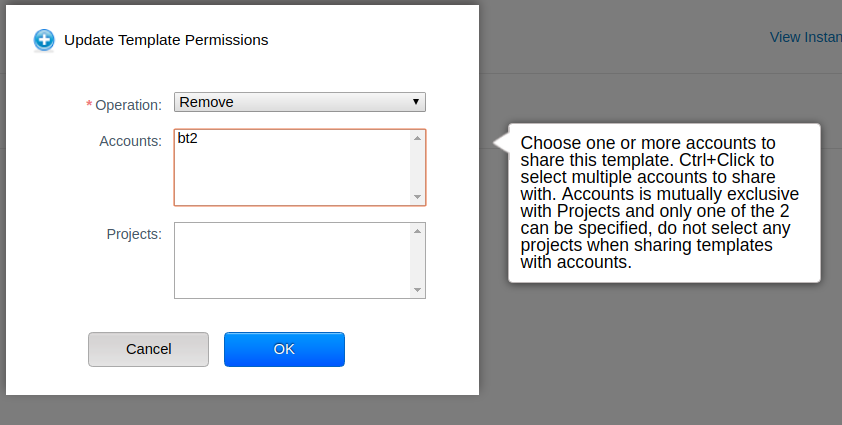
Operation = Remove , global setting: 'allow.user.view.all.domain.accounts' = true; Domain has 3 accounts in total (bt1, bt2 and bt3). The current template was only shared with bt2 by bt1 so dropdown menu only shows accounts that the current template has been shared with.
How Has This Been Tested?