"Getting started with Flutter" codelab/tutorial#798
Conversation


 googlebot
added
the
cla: yes
googlebot
added
the
cla: yes

|
Most excellent to see this coming together. You do not need to start with the project creation part. That will be done in the previous getting started / install step, see this in progress work: #800 |

|
I see, @mit-mit, thx. |
…e correct version.
|
I've also updated the staged version to today's edits. I realized that we need to get the final example app reviewed by engineering. Filip and Matt are putting some final touches on it. It should be ready for engineering review by tomorrow morning. |
|
Please feel feel free to review, @InMatrix and @sethladd! It's still in process, but we're coming down to the wire. Staged: https://sz-flutter.firebaseapp.com/tutorials/get-started/ |

|
Staging URL Generated At https://flutter-io-deploy-six.firebaseapp.com . Please allow Travis Build to finish to view the URL. |
|
I'd appreciate any feedback, @mit-mit, now that I've updated the lab. |

|
|
||
| final _saved = new Set<WordPair>(); | ||
|
|
||
| final TextStyle _biggerFont = new TextStyle(fontSize: 18.0); |

There was a problem hiding this comment.
can we drop the TextStyle annotation here? it's inferred.
(also, could we use const for the constructor?)

| return new ListView.builder( | ||
| padding: const EdgeInsets.all(16.0), | ||
| itemBuilder: (context, i) { | ||
| if (i.isOdd) return new Divider(); |

There was a problem hiding this comment.
Is this recommended styling for Dart, having if -> return on the same line for one-liners?
There was a problem hiding this comment.
If so, then the if (alreadySaved) else ... statement in previous method can be tidied up to match this style
There was a problem hiding this comment.
I'd like to table this sort of code change for now.
| pair.asPascalCase, | ||
| style: _biggerFont, | ||
| )); | ||
| }); |
There was a problem hiding this comment.
Could use simpler function syntax here: _saved.map((pair) => new ListTile(....
There was a problem hiding this comment.
I'd like to table this code change for now.
| --- | ||
|
|
||
| This is a guide to creating your first Flutter app. If you know | ||
| how to program, you can complete this tutorial. You don’t need |
There was a problem hiding this comment.
"know how to program" seems vague.
Maybe more specifically: familiar with object-oriented code and basic programming concepts such as variables, loops, and conditionals.
There was a problem hiding this comment.
"If you're familiar with mobile or web development" ?
There was a problem hiding this comment.
I went with Seth's more specific recommendations.
|
|
||
| ### What are Flutter and Dart? | ||
|
|
||
| _Flutter_ is a mobile app SDK to help developers and designers |
There was a problem hiding this comment.
This is now:
Flutter is Google’s mobile UI framework for crafting high-quality native interfaces on iOS and Android in record time. Flutter works with existing code, is used by organizations around the world, and is free and open source.
There was a problem hiding this comment.
I wonder if we can skip this intro section entirely, and get into the tutorial quicker. I would assume the developer is coming to this from the front page, or in some other way has heard what Flutter is.
| * How to implement a stateful widget. | ||
| * How to create an infinite, lazily loaded list. | ||
| * How to create and navigate to a second screen. | ||
| * . |
There was a problem hiding this comment.
Yeah, I was keeping in to remind me to reevaluate later.
|
|
||
| _Flutter_ is a mobile app SDK to help developers and designers | ||
| build modern mobile apps for iOS and Android. | ||
|
|
There was a problem hiding this comment.
Not a request to change, but as FYI this is how our current website etc puts it "Flutter is Google's new mobile UI toolkit,
helping developers craft high-quality native experiences across mobile platforms
in record time."
There was a problem hiding this comment.
Yes, changed as per Seth. I was out of date. :)
| <b> <a id="whats-the-point" class="anchor" href="#whats-the-point" aria-hidden="true"><span class="octicon octicon-link"></span></a>What you'll use:</b> | ||
|
|
||
| This tutorial requires version xxx or later of the Flutter SDK. | ||
| When you install Flutter, you get the correct version of the |
There was a problem hiding this comment.
what does "correct version" mean?
maybe "The Flutter SDK includes Flutter's engine, framework, widgets, tools, and a Dart SDK."
There was a problem hiding this comment.
I meant the version of Dart that works with this version of Flutter, but your suggested wording is better.
|
|
||
| The following video shows how the finished app works: | ||
|
|
||
| [PENDING: Matt is making the video] |
There was a problem hiding this comment.
Video is made; did you get the link? Ping me if not.
There was a problem hiding this comment.
Got it and done! :D
| Dart SDK as part of the install. You also get a Flutter Simulator, | ||
| which you can use instead of a physical mobile device. | ||
|
|
||
| These instructions feature the Android Studio IDE, but you can use whichever |
There was a problem hiding this comment.
Should we then mention that installing the Flutter SDK does not install IDE plugins ?
|
|
||
| <div class="whats-the-point" markdown="1"> | ||
|
|
||
| <b> <a id="whats-the-point" class="anchor" href="#whats-the-point" aria-hidden="true"><span class="octicon octicon-link"></span></a>What you'll use:</b> |
There was a problem hiding this comment.
Should this section tell me how to install Flutter, or just what to install?
I think we can collapse this all down to more simply: "You'll need the following installed: link, link, link"
|
|
||
| This tutorial requires version xxx or later of the Flutter SDK. | ||
| When you install Flutter, you get the correct version of the | ||
| Dart SDK as part of the install. You also get a Flutter Simulator, |
There was a problem hiding this comment.
Technically it's the iOS Simulator, which you don't automatically get when installing Flutter. Maybe better to reference the Android emulator, as this works cross platform and can be set up through Android Studio.

There was a problem hiding this comment.
However, the screenshot above was clearly taken from the iOS Simulator.
There was a problem hiding this comment.
I did not realize that the iOS emulator comes only when you install XCode. Thanks! And done.
There was a problem hiding this comment.
You are right, Tao. I'd like to put off re-taking the screenshots for now.
| Create a basic Flutter app, using the instructions in | ||
| [Mit’s new page, preferably linked to a specific anchor for | ||
| creating the templated app](). | ||
| Name the project startup_namer. You’ll be modifying this starter |
There was a problem hiding this comment.
How do I name the project?
|
|
||
| These instructions feature the Android Studio IDE, but you can use whichever | ||
| tools you prefer—Flutter and Dart plugins are also available for | ||
| VSCode and JetBrains products. |
There was a problem hiding this comment.
VSCode is a Microsoft product. Better to say "VSCode and IntelliJ IDEs"? Maybe link to their websites from here as well?
| VSCode and JetBrains products. | ||
|
|
||
| See [Mit's new setup page]() for information on how to set up | ||
| your environment and create your first simple Flutter app. |
There was a problem hiding this comment.
Let's link to the existing setup page to begin with
There was a problem hiding this comment.
See comment below, I added a redirect for now so we can safely link to /get-started/
| Create a basic Flutter app, using the instructions in | ||
| [Mit’s new page, preferably linked to a specific anchor for | ||
| creating the templated app](). | ||
| Name the project startup_namer. You’ll be modifying this starter |
There was a problem hiding this comment.
Emphasize startup_namer

 mit-mit
left a comment
mit-mit
left a comment
mit-mit
left a comment
There was a problem hiding this comment.
Some initial comments. Overall looks great!
| --- | ||
| layout: tutorial | ||
| title: Write Your First Flutter App | ||
| permalink: /tutorials/get-started/ |
There was a problem hiding this comment.
Can we make this /get-started/tutorials/? I attend to put all the future pages for get-started under that
There was a problem hiding this comment.
@mit-mit, the other tutorials are /tutorials/. I'd like to not move things around until after Flutter Beta.
| * How to implement a stateful widget. | ||
| * How to create an infinite, lazily loaded list. | ||
| * How to create and navigate to a second screen. | ||
| * . |
There was a problem hiding this comment.
What is that last bullet with just the period for?
There was a problem hiding this comment.
Removed. It was a reminder for me.
| <b> <a id="whats-the-point" class="anchor" href="#whats-the-point" aria-hidden="true"><span class="octicon octicon-link"></span></a>What you'll use:</b> | ||
|
|
||
| This tutorial requires version xxx or later of the Flutter SDK. | ||
| When you install Flutter, you get the correct version of the |
There was a problem hiding this comment.
I would leave out the Dart SDK part
|
|
||
| This tutorial requires version xxx or later of the Flutter SDK. | ||
| When you install Flutter, you get the correct version of the | ||
| Dart SDK as part of the install. You also get a Flutter Simulator, |
| tools you prefer—Flutter and Dart plugins are also available for | ||
| VSCode and JetBrains products. | ||
|
|
||
| See [Mit's new setup page]() for information on how to set up |
There was a problem hiding this comment.
You should link to /get-started/. That is the "future home", but we already have a redirect there so the link works with the existing setup flow.
There was a problem hiding this comment.
Matt told me earlier today that your page is coming after next week. Yes?
|
|
||
| <b> <a id="whats-the-point" class="anchor" href="#whats-the-point" aria-hidden="true"><span class="octicon octicon-link"></span></a>What you'll use:</b> | ||
|
|
||
| This tutorial requires version xxx or later of the Flutter SDK. |
There was a problem hiding this comment.
Should we just ask the user to do a flutter upgrade without asking them to check the version number?
There was a problem hiding this comment.
Updating is not enough if you are on the wrong channel
| <aside class="alert alert-success" markdown="1"> | ||
| <i class="fa fa-lightbulb-o"> </i> **Tip:** | ||
| When pasting code into your app, indentation can | ||
| become skewed. You can fix this in Android Studio by right-clicking the |
There was a problem hiding this comment.
I would make this section a bit more general, like this:
You can fix this automatically with our tools:
  * Android Studio / IntelliJ IDEA: right-click the dart code and select  **Reformat Code with dartfmt**
  * VS Code: right-click the code and select **Format Document**
  * Terminal: run `flutter format <filename>`
| </li> | ||
|
|
||
| <li markdown="1"> | ||
| Run the app. You should see the following screen. |
There was a problem hiding this comment.
Here, and generally after each change, can we tell the developer to hot reload rather than run? Would need to check that all the changes actually do reload, though!
There was a problem hiding this comment.
OK, I just changed all instances to hot reload instead of run. But I need to go back and check because I think at least one of them requires a restart. But I noticed that AS TELLS you when you need to restart. Nice!
| You can find the | ||
| [english_words](https://pub.dartlang.org/packages/english_words) | ||
| package, as well as many other open source packages, on | ||
| [pub.dartlang.org](https://pub.dartlang.org/). |
There was a problem hiding this comment.
I suggest we for the second link use https://pub.dartlang.org/flutter to get the flutter landing page and not the general front page.
| ## Step 1: Create the starting Flutter app | ||
|
|
||
| Create a basic Flutter app, using the instructions in | ||
| [Mit’s new page, preferably linked to a specific anchor for |
There was a problem hiding this comment.
Let me get back to you on this shortly!
There was a problem hiding this comment.
After talking to Matt this morning, I am just telling them to paste in a Hello World. Until after next week when things are more settled.
| lower level widgets. | ||
| </li> | ||
| <li markdown="1"> Moving the “hello world” text into a separate widget, | ||
| HelloWorld, results in an identical widget tree as the code abovr. |
There was a problem hiding this comment.
Typo: abovr -> above
| appBar: new AppBar( | ||
| title: new Text('Welcome to Flutter'), | ||
| ), | ||
| body: new Center(child: new Text('Hello World')), |
There was a problem hiding this comment.
child: new Center should be on a new line?
There was a problem hiding this comment.
I'd like to table this change for now.
| ), | ||
| ); | ||
| } | ||
| } |
There was a problem hiding this comment.
Should this code show hello world moved into a new widget?
There was a problem hiding this comment.
Yes, not sure how that happened. I'm removing this for now. I also worry that it might be confusing to have 2 versions of Hello World.

| </li> | ||
|
|
||
| <li markdown="1"> | ||
| Run the app. You should now see open hearts on each row, but they aren't yet |
There was a problem hiding this comment.
Maybe we should clarify when the user needs to "run/restart" the app vs "hot reload" their app.
There was a problem hiding this comment.
Yup. See comment below.
| </li> | ||
| </ol> | ||
|
|
||
| Run the app. You should be able to tap the hearts to favorite, or unfavorite, |
There was a problem hiding this comment.
Hot reload will work fine for the above changes. We should encourage users to hot reload whenever it's applicable and explain why they need to restart their app after making certain types of changes. Cc: @mit-mit
There was a problem hiding this comment.
Makes sense. My assumption was that "Run" was clear enough. It doesn't say "Restart". But I changed all instructions to "Hot reload" and I need to re-test to make sure what needs run. That will take me awhile. :)

|
I just went through what's been written so far. Overall, I found it a great first tutorial which covers a lot of ground. My only concern is that many users might not be able to finish the tutorial in one sitting. So we need to help them get back to the tutorial after interruptions. We can do this by linking to the tutorial from the code and linking to different sections from relevant pages on flutter.io and related API docs. In addition, splitting the tutorial into several pages might enable us to track completion rate. SZ: @InMatrix, we should discuss this in person. In the past, when I broke these tutorials into multiple pages, I got pushback. When I convert this to codelabs.google.com for Google I/O, it will be different pages. I like your idea of cross linking, but it requires some thought. |
| </li> | ||
|
|
||
| <li markdown="1"> | ||
| When the user taps the list icon in the app bar, build a Material route |
There was a problem hiding this comment.
Do we need to say something about the "Material" in "Material route" here? If it's not important, we can just say "route".
There was a problem hiding this comment.
Good point. I deleted "Material".
| <!-- skip --> | ||
| {% prettify dart %} | ||
| void _pushSaved() { | ||
| Navigator.of(context).push([[/highlight]] |
There was a problem hiding this comment.
Should this [[/highlight]] be removed?
| previous experience with Dart or mobile programming. | ||
|
|
||
| * TOC | ||
| {:toc} |
There was a problem hiding this comment.
Is it possible to not show the sub-section titles, many of which are "Problems?", in the TOC?
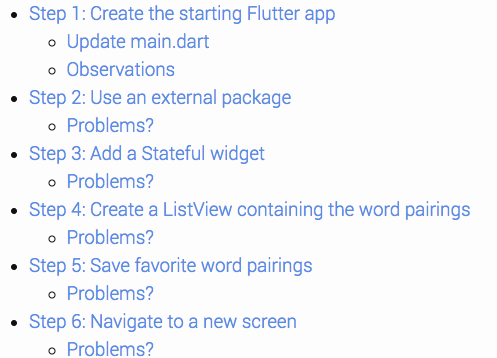
There was a problem hiding this comment.
The autogenerated TOC only goes to level 3 headers. So I popped everything up a level.
There was a problem hiding this comment.
Btw, it doesn't help. The doc doesn't use headers for the steps. This needs a different solution, for after it lands.
 Sfshaza
changed the title
Sfshaza
changed the title

 redbrogdon
left a comment
redbrogdon
left a comment
redbrogdon
left a comment
There was a problem hiding this comment.
LGTM with one highlighting change to a code snippet. Also added some small suggestions.
|
|
||
| ## What you'll build | ||
|
|
||
| You’ll implement a simple mobile app that proposes names for a |
There was a problem hiding this comment.
I might go with "generates" for this first one, even though you're using "proposes" later in the doc.
| # Step 1: Create the starting Flutter app | ||
|
|
||
| Create a simple, templated Flutter app, using the instructions in | ||
| [Getting Started with your first Flutter app.](/getting-started/) |
There was a problem hiding this comment.
I know you have no choice here, but the fact that you have to direct people away to a step-by-step guide bums me out. Has there been any discussion about whether it'd be simpler to pick either CLI/Text Editor or IntelliJ as a default and run with it?
There was a problem hiding this comment.
Yes, in the end, we want a new flow. We want a smooth flow from Mit's new setup pages to my codelab. It's not idea right now.
There was a problem hiding this comment.
I think we can assume that the developer came into this flow from https://flutter-website-staging.firebaseapp.com/get-started/create-and-run/, and thus just learned how to create an app.
So mayby rephrase to: Create a simple, templated Flutter app, as you just learned in the previous [test drive](/get-started/test-drive/) step ?
Note that the link was also corrected
| ## Observations | ||
|
|
||
| <ul markdown="1"> | ||
| <li markdown="1"> This example creates a Material app. |
There was a problem hiding this comment.
Were I new to Flutter, I wouldn't understand the term "Material app." Consider adding a clause explaining what makes a material app different from any other.
|
|
||
| </ol> | ||
|
|
||
| Restart the app. If you try to hot reload, you might see an error: |
There was a problem hiding this comment.
Is this something the reader should be concerned about, or is it no big deal? Either way, I'd consider adding a sentence to say "just ignore it," or "fix it by doing a full restart"."
| {% endprettify %} | ||
| </li> | ||
|
|
||
| <li markdown="1"> Add a `biggerFont` variable for making the font size larger: |
There was a problem hiding this comment.
Yeah, I kept moving this step around. For now, I've coalesced it with the step where they add the _suggestions variable.
| <li markdown="1"> Make the hearts tappable in the `_buildRow` method. | ||
| If a word entry has already been added to favorites, tapping it again | ||
| removes it from favorites. When the heart has been tapped, the method | ||
| calls `setState()`. Calling this method signals the build system that |
There was a problem hiding this comment.
It may not be clear to someone unfamiliar with reactive apps that this means the Widgets get redrawn. Consider highlighting the fact that calling setState will trigger a call to the build method of the State object, and an update of the UI.
| [[highlight]]tiles: tiles,[[/highlight]] | ||
| [[highlight]])[[/highlight]] | ||
| [[highlight]].toList();[[/highlight]] | ||
| ); |
There was a problem hiding this comment.
You're missing a couple closing brackets/parens on this method here. They show up in lines 1098 and 1099 without ever getting a highlighted "this is where you add these" step.
There was a problem hiding this comment.
Thanks for catching!
| Tap the back button to return to the home route. | ||
| </li> | ||
|
|
||
| <li markdown="1"> You can easily change an app's theme by configuring |
There was a problem hiding this comment.
Should changing the theme be a separate section, something that's on an equal footing with stuff like "Add Interactivity?"
There was a problem hiding this comment.
Yes, I can see done. Done.
| </li> | ||
|
|
||
| <li markdown="1"> Hot reload the app. You'll notice that the background is white, | ||
| even the app bar. |
There was a problem hiding this comment.
This might be a good time to suggest they play around with hot reload. Something like "Try changing the color again (Colors has a lot of constants!) and saving the code to trigger a hot reload. You can quickly experiment with a lot of UI details this way."
There was a problem hiding this comment.
I added it as an exercise for the reader. Thanks so much!
| * [Building Layouts in Flutter](/tutorials/layout/) tutorial | ||
| * [Add Interactivity](/tutorials/interactive/) tutorial | ||
| * [Flutter Cookbook](/cookbook/) | ||
| * [From Java to Dart](https://codelabs.developers.google.com/codelabs/from-java-to-dart/#0) codelab |
There was a problem hiding this comment.
Is the gitter channel (https://gitter.im/flutter/flutter) considered an official source for help?
There was a problem hiding this comment.
I believe so, but Filip doesn't want me adding community links. They will be added to the footer soon.

* Put gif of final app to the right of TOC

* Remove “Problems?” from TOC

* Remove unnecessary text from top

|
So there's good news and bad news. 👍 The good news is that everyone that needs to sign a CLA (the pull request submitter and all commit authors) have done so. Everything is all good there. 😕 The bad news is that it appears that one or more commits were authored by someone other than the pull request submitter. We need to confirm that all authors are ok with their commits being contributed to this project. Please have them confirm that here in the pull request. Note to project maintainer: This is a terminal state, meaning the |
googlebot
added
cla: no
|
@filiph as per the cla bot, can you add a statement that you "are ok with their commits being contributed to this project." ? |

|
I am ok with my commits being contributed to this project. (Weird that I need to do this here. Welp.) |

|
|
||
| <figure class="right-figure" style="max-width: 250px"> | ||
| <img src="images/startup-namer-app.gif" | ||
| alt="Animated GIF of the app that you will be building." |

There was a problem hiding this comment.
this is not good alternative text. See https://html.spec.whatwg.org/multipage/images.html#alt for advice.
11 participants


Staged: https://sz-flutter.firebaseapp.com/tutorials/get-started/
Yes, I will be removing that eyeball. LOL It makes the TOC creepy.
Here's a start, @mjohnsullivan. I'll pick it up again tomorrow.