Bug: Powershell Sensor output differs from expected result #152


Description

Please make sure your bug isn't already listed on HASS.Agent's issue tracker:
https://lab02research.youtrack.cloud/
There's a list of open bugs & features on the right. On the left you can see what's being worked on, what's planned and what's ready for the next release.
If you're not sure, don't worry, just go ahead and we'll discuss :)
Describe the bug
A clear and concise description of what the bug is.
With a powershell sensor that only outputs true or false, one would expect that HomeAssistant also only receives a true or false. However, the event listeren detects it as 'True\r\n' and 'False\r\n'
To Reproduce
Steps to reproduce the behavior:
- Have a script with a true or false output.
- make sure that sensor reports True or False (based in the desired sensor actions.)
- In HA go to events.
- listen for a state_stanged event
- force the powershell sensor to change states to see the output in the event listener
- see the old_state and new_state as 'True\r\n' and 'False\r\n' instead of regularly True and False
Expected behavior
The state of the sensor would be what hass.agent reports, just true or false
Screenshots
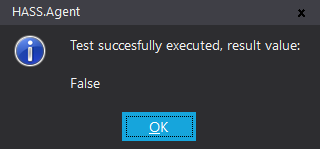
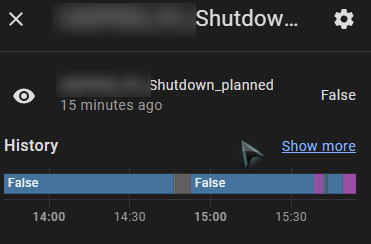
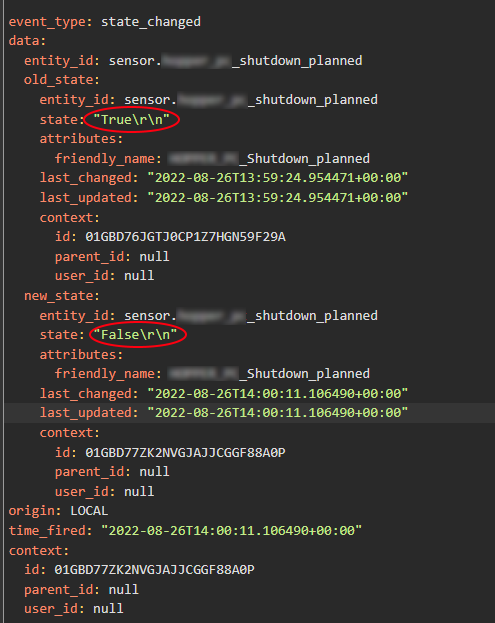
Misc info (please complete the following information):
-
Windows build (ideally screenshot/info of
winver.exeoutput): -
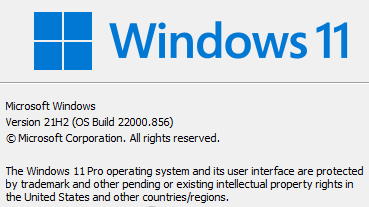
-
Windows' UI language: English (US)
-
HASS.Agent version: 2022.13.3-beta2
Please check what's applicable (multiple answers possible):
- Installed via installer
- Installed manually
- Problem occurs in HASS.Agent
- Problem occurs in Satellite Service
Additional context
Add any other context about the problem here.
Logs
If possible, please provide the logs of HASS.Agent and - if applicable - the Satellite Service. You can find HASS.Agent's logs by going to the main window, then Configuration -> Logging -> open logs folder. The Satellite Service's logs are in the same window, but the Satellite Service tab -> open service logs folder. If you want, you can mail them to lab02research@outlook.com